


Action View
Action View is the presentation layer in Ruby on Rails that renders data into HTML or other formats for users. It uses templates, layouts, partials, and helpers to keep views organized and reusable.
Table of Contents
What is Action View in Ruby on Rails?
Action View in Ruby on Rails is the framework responsible for handling how your application’s data is displayed to users. While controllers process requests and models manage data, Action View takes care of rendering HTML (or other formats like JSON) that users see in their browser. In simple terms, it’s what turns your application’s logic into a visually understandable web page.
Why is Action View Useful?
Without Action View, a Rails app would only process data in the backend without presenting it to users. It allows developers to separate the app’s logic (handled by models and controllers) from its presentation (handled by views). This separation makes code cleaner, easier to maintain, and more scalable. Action View also supports templates, partials, layouts, and helpers, giving developers flexibility and efficiency when building complex interfaces.
How Action View Works?
-
Templates: Files (usually .html.erb or .html.haml) that contain HTML combined with embedded Ruby code (ERB). These templates define how data is displayed.
-
Partials: Reusable view snippets that can be included in multiple templates, reducing code duplication.
-
Layouts: Master templates that wrap around specific views to provide a consistent structure (like headers, footers, or navigation bars).
-
Helpers: Methods that simplify common tasks in views, such as formatting dates or generating links.
When a controller action is triggered, Rails automatically finds the corresponding view template in app/views/ and uses Action View to render it with the data passed from the controller.
When a controller action runs, Rails uses built-in naming rules and folder structures to automatically find and render the correct template.
It looks inside the app/views/<controller_name>/ directory. It finds a template that matches the action name (e.g., index.html.erb for UsersController#index). It renders the template using Action View and passes in any instance variables defined in the controller.
Examples:
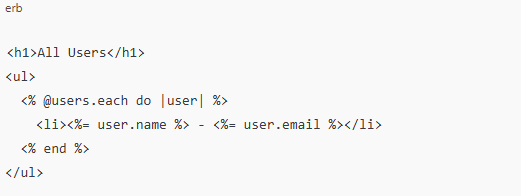
Rendering a simple list of users in _app/views/users/index.html.erb_:
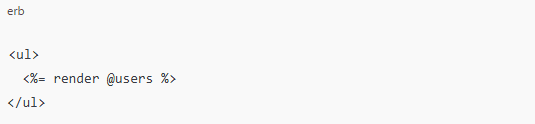
Using a partial to render a single user (_user.html.erb):

Then include it in your main template:
Where to Use Action View?
-
· Building user dashboards
-
· Rendering product listings in an e-commerce site
-
· Displaying blog posts, comments, or news feeds
-
· Designing forms for user input (sign-ups, feedback, checkouts)
-
· Creating reusable components for consistent UI
In Summary
Action View is the presentation layer of Ruby on Rails. It transforms application data into user-friendly web pages through templates, layouts, and helpers. By keeping design and logic separate, Action View makes applications easier to maintain, more scalable, and visually consistent.