Building a RAG System with Ruby on Rails and pgvector
Build a Retrieval-Augmented Generation (RAG) system in Rails with pgvector. Learn how to improve AI accuracy with semantic search and real-time data.


Pichandal
Technical Content Writer


As more applications integrate AI features today, a common issue starts surfacing quickly is that LLMs don’t always know what they should. They can produce confident answers that are outdated, incomplete, or simply incorrect. In customer-facing systems or internal tools, this is not just a technical flaw; it directly impacts trust and usability.
This is where RAG becomes essential. Instead of expecting the model to “know everything,” you design the system to retrieve the right information at the right time.
A RAG (Retrieval-Augmented Generation) system improves how AI applications generate responses by combining language models with external data retrieval.
Instead of relying only on what a model was trained on, it fetches relevant, real-time or domain-specific information before generating an answer. This makes responses more accurate, contextual, and useful in production environments.
Recent industry observations suggest factual hallucination rates across state-of-the-art LLMs can range from 31% to as high as 82%, depending on the domain and prompt type. This is one of the main reasons why RAG-based approaches are now widely adopted in enterprise AI systems.
This article explores how to build a RAG system in a Ruby on Rails application using pgvector, focusing on the key steps, trade-offs, and implementation details that matter in practice.
How does a RAG system actually work?
At its core, a RAG system connects two distinct steps:
Retrieving relevant information
and
Generating a response based on that information
The process starts when a user submits a query. Instead of directly passing that query to an LLM, the system first converts it into an embedding, a numerical representation that captures the semantic meaning of the text. This embedding is then used to search a vector database for similar pieces of content.
Once relevant data is retrieved, it is added to the prompt sent to the LLM. The model then generates a response using both its pre-trained knowledge and the retrieved context.
Here’s how the flow typically looks:
-
User submits a query
-
Query is converted into an embedding
-
Vector search retrieves similar content
-
Retrieved content is added to the prompt
-
LLM generates a response
Core components in a RAG system:
-
Embedding model: Converts text into vectors that capture meaning
-
Vector database: Stores embeddings and enables similarity search
-
Retriever: Fetches relevant data based on similarity
-
Generator (LLM): Produces the final response
What makes this approach effective is not just the model, but the quality of retrieval. If the system retrieves the right context, even a smaller model can produce strong results. If retrieval fails, even the best model will struggle.
Understanding this flow is essential when learning how to build RAG applications using Ruby on Rails, as each step directly impacts the final output.
Why use Ruby on Rails and pgvector for building a RAG system?
There’s a common misconception that building AI systems requires a completely different stack. In reality, most production AI applications rely on combining existing backend frameworks with external AI services.
Ruby on Rails fits naturally into this setup, not as the machine learning engine, but as the layer that connects everything.
Rails handles request flow, integrates APIs, manages data, and orchestrates the pipeline. This becomes especially valuable when you’re building features like AI-powered search, assistants, or internal tools, where speed of iteration matters.
At the same time, pgvector simplifies one of the more complex parts of a RAG system: storing and querying embeddings.
Instead of introducing a separate vector database, pgvector allows you to use PostgreSQL for vector similarity search. For teams already using Rails with Postgres, this removes a significant amount of setup and operational overhead.
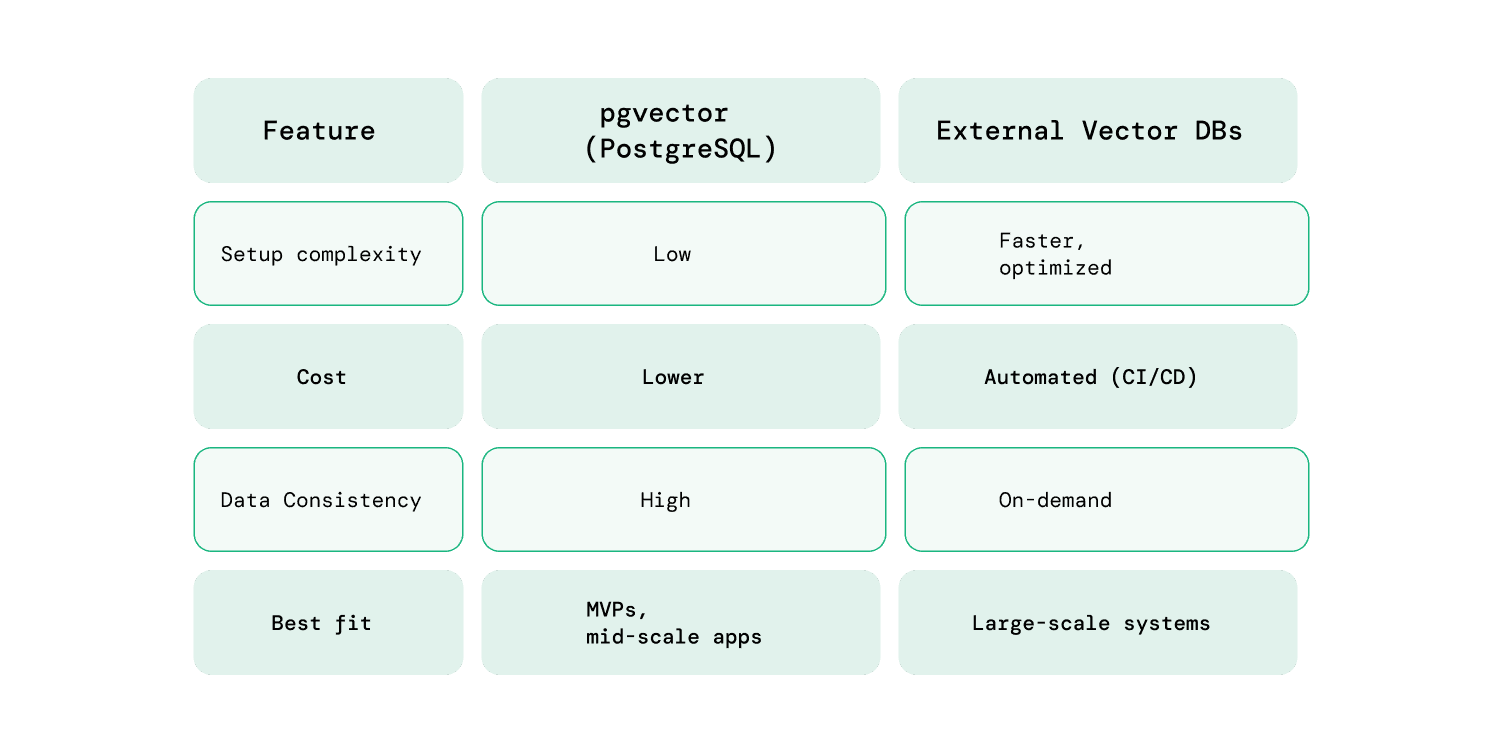
For many real-world applications, especially internal tools or early-stage AI features, pgvector is more than sufficient. It keeps the architecture simple while still enabling semantic search capabilities.
How to build a RAG system in Ruby on Rails with pgvector (step-by-step)
Building a RAG system in Rails is less about complex machine learning and more about structuring a reliable pipeline.
Now that the fundamentals are clear, the next step is to build a powerhouse Retrieval-Augmented Generation (RAG) system with Ruby on Rails by putting these components together in a structured pipeline.
Step 1: Set up pgvector in PostgreSQL
Start by enabling vector support in your PostgreSQL database. This allows you to store and query embeddings directly within your existing setup.
CREATE EXTENSION IF NOT EXISTS vector;
Next, add a vector column to store embeddings:
add_column :documents, :embedding, :vector, limit: 1536
The dimension (1536) depends on the embedding model you choose. Keeping embeddings within PostgreSQL simplifies your architecture and avoids introducing additional infrastructure early on.
Step 2: Ingest and prepare your data
Raw data needs to be structured before it can be used effectively in a RAG system.
Chunking documents
Break large documents into smaller, meaningful chunks. This improves retrieval accuracy and ensures the model receives focused context.
-
Avoid overly large chunks (adds noise)
-
Avoid very small chunks (loses context)
Storing metadata
Attach metadata to each chunk, such as:
-
Source
-
Section title
-
Tags or categories
This helps with filtering and improves retrieval precision later.
Step 3: Generate and store embeddings
Once your data is prepared, convert each chunk into embeddings using an external model (e.g., OpenAI or open-source alternatives).
-
Send text to the embedding API
-
Store the resulting vector in PostgreSQL
-
Use background jobs (like Sidekiq) for scalability
Processing embeddings asynchronously ensures your app remains responsive, especially when handling large datasets.
This step is a core part of building RAG applications using Ruby on Rails, as embedding quality directly affects retrieval accuracy.
Step 4: Implement semantic search using pgvector
When a user submits a query, convert it into an embedding and perform a similarity search.
SELECT * FROM documents
ORDER BY embedding <-> '[query_vector]'
LIMIT 5;
This query retrieves the most relevant results based on vector similarity.
To improve results further:
-
Combine with metadata filters
-
Adjust the number of results (top-k)
-
Rank results based on relevance
This step directly determines how useful your final responses will be.
Step 5: Generate responses using an LLM
After retrieving relevant data, pass it to the LLM along with the user query.
A well-structured prompt typically includes:
-
The original question
-
Retrieved context
-
Clear instructions (e.g., “Answer using only the provided context”)
Be mindful of token limits. Including too much context can reduce response quality instead of improving it.
Step 6: Iterate and refine the pipeline
A RAG system is rarely perfect on the first attempt. Improving it requires continuous refinement.
Focus on:
-
Adjusting chunk sizes
-
Improving retrieval relevance
-
Cleaning noisy data
-
Refining prompts
Small improvements at each step can significantly impact the overall quality of responses.
What are real-world use cases and common challenges?
RAG systems are most valuable in scenarios where accuracy, context, and up-to-date information matter more than generic responses. Instead of replacing existing workflows, they typically enhance how users access and interact with information.
Common real-world use cases
1. Internal knowledge assistants
Teams often struggle to find information across scattered docs, tickets, and shared tools. A RAG-based assistant solves this by retrieving relevant answers instantly, reducing dependency on senior team members while speeding up onboarding and issue resolution.
2. Customer support automation
Traditional chatbots break down when handling complex or context-specific queries. RAG improves this by generating responses directly from support documentation, increasing accuracy and reducing repetitive workload for support teams.
3. AI-powered search in SaaS products
Keyword-based search limits discoverability when users don’t know the exact terms to search for. RAG enables intent-driven semantic search, making it easier to surface relevant information and improving overall user experience.
4. Document-heavy workflows
In domains like legal or finance, reviewing large volumes of documents is time-consuming. RAG streamlines this by retrieving and summarizing the most relevant sections, allowing faster access to insights without manual scanning.
Common challenges (and how to handle them)
Building a RAG system is not just about connecting APIs. Most issues come from how data is structured, retrieved, and used.
While learning about how to build RAG applications using Ruby on Rails, the below challenges often surface during real-world implementation.
1. Poor retrieval quality
If retrieval fails, the entire system fails, regardless of how good your LLM is.
Common causes:
-
Weak chunking strategy
-
Missing metadata
-
Low-quality embeddings
How to handle it:
-
Use consistent chunk sizes (200–500 tokens as a starting point)
-
Add metadata like source, category, and timestamps
-
Experiment with different embedding models if relevance is low
-
Log failed queries to understand where retrieval breaks
2. Too much or noisy context
Adding more data does not guarantee better answers. In many cases, it makes responses worse.
Common issues:
-
Too many retrieved chunks
-
Irrelevant or redundant content
-
Token limits cutting off useful context
How to handle it:
-
Limit top-k results (start with 3–5)
-
Clean and preprocess retrieved text
-
Prioritize relevance over volume
-
Add instructions like “use only relevant context” in prompts
3. Data freshness and maintenance
RAG systems rely on stored embeddings, which can become outdated as your data evolves.
Common issues:
-
New data not indexed
-
Old data still being retrieved
-
Inconsistent updates
How to handle it:
-
Set up background jobs to re-embed updated content
-
Use timestamps or versioning for documents
-
Periodically clean outdated or low-value data
-
Automate ingestion pipelines where possible
4. Cost management
RAG systems introduce multiple cost layers such as embeddings, storage, and LLM usage.
Common issues:
-
Repeated embedding requests
-
High LLM API usage
-
Unoptimized queries
How to handle it:
-
Cache embeddings and responses for repeated queries
-
Batch embedding requests to reduce API calls
-
Avoid unnecessary reprocessing of unchanged data
-
Monitor usage and set limits where needed
5. Latency and user experience
Each step in the RAG pipeline adds processing time, which can affect real-time applications.
Common issues:
-
Slow embedding generation
-
Delays in database queries
-
LLM response time
How to handle it:
-
Cache frequent queries and results
-
Use indexing to speed up vector search
-
Stream responses from the LLM where possible
-
Precompute embeddings for common queries (if applicable)
Understanding both the challenges and their solutions helps you build more reliable systems from the start and deliver better user experiences.
Final thoughts: Building RAG Applications with Ruby on Rails
Rails continues to be a practical choice when exploring how to build RAG applications using Ruby on Rails, especially when combined with tools like pgvector and external LLM APIs.
For teams exploring this space, hiring experienced rails developers and working with teams that understand both Rails and AI patterns can make a significant difference.
But the real advantage comes from how you design the system, not just the tools you choose. At RailsFactory, with long-standing experience in the Rails ecosystem, the focus is increasingly on combining that foundation with practical AI implementations to deliver real-world solutions.
If you need an extra hand implementing AI-driven features or building a RAG system in your Rails application, the RailsFactory team can help you get there faster with the right approach.