How to support and maintain a legacy Ruby on Rails app
Discover practical strategies for maintaining legacy Rails applications while improving stability, maintainability, and delivery speed.


Pichandal
Technical Content Writer


Many companies still rely on legacy Ruby on Rails applications to power revenue-generating platforms, customer operations, and internal workflows. The real challenge is not that these systems are old. It’s the unmanaged complexity that gradually makes it harder to maintain, upgrade, and scale safely over time.
Applications that once shipped features quickly can eventually become difficult to evolve. Releases slow down. Developers become hesitant to modify core functionality. Rails upgrades feel risky. Debugging takes longer. Infrastructure drifts out of date.
At that point, teams often assume the only solution is a complete rewrite.
In reality, most legacy Rails applications do not need to be rebuilt from scratch. They need structure, visibility, gradual modernization, and disciplined engineering practices.
A legacy Rails application is not automatically a liability. More often, it is a business-critical system carrying years of operational knowledge, edge-case handling, and proven workflows.
The goal is not to avoid legacy systems entirely.
The goal is to evolve them safely through sustainable Ruby on Rails maintenance practices.
What Makes a Rails Application “Legacy”?
A Rails application becomes “legacy” long before it becomes unusable.
The issue is rarely the Rails version alone. Many older Rails applications continue operating successfully at scale in 2026.
A Rails application usually becomes legacy when teams begin experiencing maintainability risk.
Common signs include:
-
Developers fear touching critical modules
-
Releases become slower and riskier
-
Debugging takes significantly longer
-
New engineers struggle to onboard
-
Dependencies fall behind supported versions
-
Infrastructure becomes fragile
-
Performance issues become difficult to trace
Legacy is primarily a maintainability problem
A five-year-old Rails app with strong engineering practices may remain healthy.
Meanwhile, a two-year-old application with poor architectural discipline can already feel unmanageable.
That distinction matters because it changes how teams approach application modernization.
The objective is not simply upgrading Rails versions. The objective is restoring confidence, visibility, and development velocity through structured Ruby on Rails maintenance.
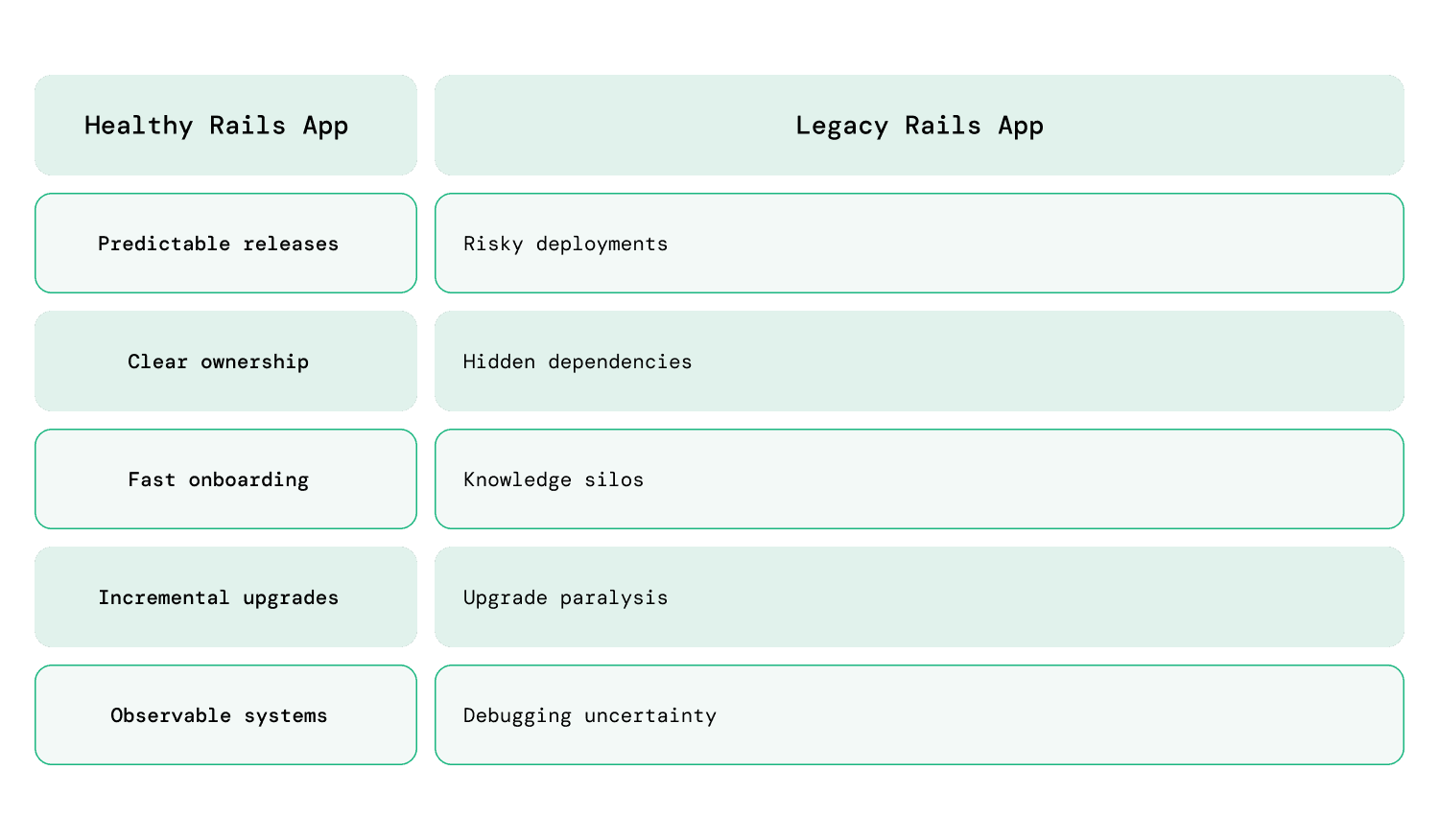
According to the 2025 Stack Overflow Developer Survey, maintainability and technical debt remain among the most common long-term engineering concerns across mature software systems.
What Challenges Do Teams Face with Legacy Rails Applications Maintenance?
Fear of Changing the Codebase
One of the biggest warning signs in a legacy Rails application is when developers actively avoid certain parts of the system. Teams become hesitant to make changes because even small updates can trigger unexpected regressions or deployment issues.
This usually leads to slower releases, longer QA cycles, defensive code reviews, and growing reluctance toward refactoring.
As a result, the application gradually loses developer trust, making Ruby on Rails maintenance increasingly difficult.
Business Logic Becomes Scattered
As applications grow, business logic slowly spreads across controllers, models, callbacks, jobs, and integrations, making workflows difficult to trace.
This often leads to:
-
Difficult debugging
-
Hidden side effects
-
Confusing workflows
-
Longer onboarding time
-
Inconsistent behavior
-
Slower feature development
For example: A simple checkout action may trigger callbacks, background jobs, emails, payment updates, and third-party integrations across multiple files.
God Models and Overloaded ActiveRecord Classes
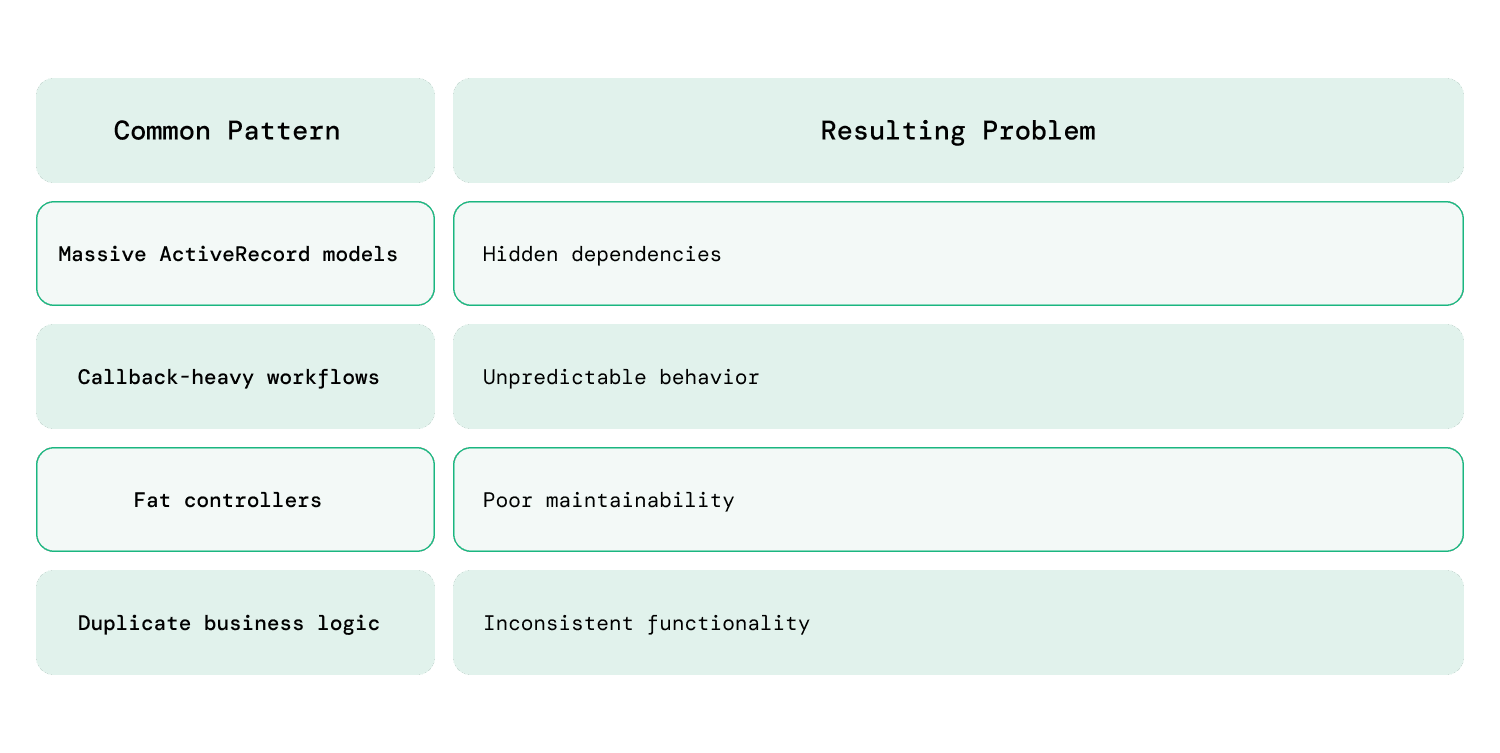
Many legacy Rails applications contain large ActiveRecord models responsible for far more than database interactions. A single model may eventually manage validations, workflows, integrations, reporting logic, and background jobs simultaneously.
In many legacy Rails applications, models like User, Order, or Subscription gradually grow into thousands of lines of code handling validations, billing logic, email triggers, reporting, and external integrations simultaneously.
These overloaded models create tightly coupled systems that become difficult to test, debug, and safely modify.
Dependency Hell and Unsupported Gems
Older Rails applications often depend on outdated gems, unsupported Ruby versions, deprecated frontend tooling, and internal monkey patches accumulated over years.
Over time, these dependencies create security concerns, upgrade blockers, compatibility conflicts, and operational instability.
The business eventually becomes dependent on software that is no longer actively maintained.
Technical Debt Slows Development Velocity
Legacy applications rarely fail all at once. More commonly, they slowly become harder and slower to develop.
Feature delivery takes longer, QA effort increases, debugging consumes more engineering time, and developers become cautious about making changes.
The application may still function correctly in production, but the engineering team gradually loses delivery speed, due to growing Ruby on Rails maintenance challenges.
Infrastructure and Deployment Drift
Legacy maintenance problems extend beyond application code. Infrastructure often becomes outdated alongside the Rails application itself.
Older CI/CD pipelines, inconsistent environments, manual deployment processes, and unsupported operating systems gradually increase operational fragility.
Infrastructure debt eventually slows engineering teams just as much as application-level technical debt.
Hidden Performance Bottlenecks
Performance problems in legacy Rails applications usually emerge gradually through years of accumulated inefficiencies.
Issues like N+1 queries, excessive callbacks, overloaded background jobs, and inefficient database access patterns slowly reduce application responsiveness.
In most cases, Rails itself is not the bottleneck. The real issue is unmanaged complexity and lack of architectural discipline over time, which weakens long-term legacy Rails application maintenance efforts.
What Mistakes Do Teams Make With Legacy Rails Apps?
Assuming a rewrite is the only solution
Full rewrites are risky because they underestimate hidden business complexity.
Legacy applications often contain years of:
-
Operational edge cases
-
Customer-specific workflows
-
Revenue-critical logic
-
Hard-earned production knowledge
Rewrites frequently introduce:
-
Long delivery delays
-
Feature freezes
-
Budget overruns
-
Regression risks
Most mature Rails systems can evolve successfully through incremental application modernization instead.
Upgrading everything at once
Large-scale upgrades increase risk dramatically.
Trying to upgrade:
-
Rails
-
Ruby
-
Frontend tooling
-
Infrastructure
-
Dependencies
all simultaneously creates difficult stabilization periods.
Incremental application modernization is usually safer and more manageable.
Refactoring without visibility
Refactoring legacy systems without sufficient visibility often creates new failures.
Teams need:
-
Monitoring
-
Logging
-
Test coverage
-
Dependency awareness
-
Architecture documentation
before major structural changes begin.
Ignoring maintainability for too long
Many teams continue prioritizing feature delivery while postponing upgrades, refactoring, and cleanup work for later. Initially, this may not create visible problems, but complexity quietly compounds over time.
As maintenance gets repeatedly delayed, upgrades become harder, technical debt increases, and development velocity gradually slows down.
As a result, the small maintenance gaps today often become major modernization challenges later.
What Is the Best Strategy for Maintaining a Legacy Rails Application?
Step 0: Assess and Audit
Before making changes, teams need a clear understanding of the application’s current condition. Many legacy Rails systems contain years of hidden complexity, outdated dependencies, undocumented workflows, and infrastructure drift.
Start by identifying:
-
Unsupported gems and dependency risks
-
High-risk workflows and fragile modules
-
Performance bottlenecks and recurring production issues
-
Areas with weak or missing test coverage
-
Infrastructure inconsistencies and deployment risks
A proper assessment helps teams prioritize modernization work based on business impact instead of assumptions.
Step 1: Stabilize the Application First
Before attempting major upgrades or refactoring, teams should first reduce operational instability and address recurring production issues that affect reliability. This helps reduce deployment failures, improve release predictability, and restore developer confidence.
Hence, teams must focus on:
-
Fixing frequently recurring bugs and production incidents
-
Identifying fragile workflows that break during deployments
-
Reducing deployment failures and rollback frequency
-
Improving visibility into critical application failures
-
Prioritizing operational stability before modernization
The goal at this stage is improving predictability before introducing larger changes.
Step 2: Reduce Dependency Risk
Legacy Rails applications often accumulate outdated, abandoned, or unnecessary dependencies over many years. These dependencies gradually become upgrade blockers and operational risks.
Focus on:
-
Replacing unsupported or abandoned gems
-
Removing unused libraries and integrations
-
Auditing security vulnerabilities in dependencies
-
Updating outdated frontend tooling gradually
-
Reducing dependency sprawl wherever possible
Smaller and healthier dependency trees make future upgrades significantly easier.
Step 3: Improve Visibility Into the System
Many legacy systems become difficult to maintain because teams lack visibility into application behavior, failures, and performance bottlenecks.
Introduce:
-
Centralized logging for easier debugging
-
Error monitoring to track recurring failures
-
Performance monitoring for slow queries and requests
-
Dependency auditing and health tracking
-
Architecture mapping for better system understanding
With better visibility, teams debug issues faster, reduce downtime, and improve operational efficiency.
Step 4: Protect Critical Business Workflows With Tests
Instead of chasing full test coverage immediately, teams should first secure the workflows that directly affect business continuity and customer experience.
Prioritize:
-
Authentication and authorization flows
-
Payments and subscription management
-
Checkout and order processing
-
Core onboarding journeys
-
Revenue-critical APIs and integrations
Characterization tests are especially valuable because they document current behavior before refactoring begins.
Step 5: Upgrade Rails Incrementally
Large upgrade jumps usually create unnecessary operational risk and long stabilization periods. Smaller, continuous upgrades are far easier to manage safely.
A practical approach includes:
-
Upgrading Rails in smaller version increments
-
Cleaning deprecations continuously
-
Updating gems gradually alongside Rails upgrades
-
Maintaining Ruby compatibility regularly
-
Avoiding long upgrade gaps whenever possible
Delayed upgrades are often what turn manageable maintenance into expensive modernization projects. In contrast, proactive Ruby on Rails maintenance reduces upgrade complexity before technical debt compounds further.
Step 6: Refactor Gradually Instead of Rewriting
Most legacy Rails applications benefit more from controlled evolution than complete rewrites. Incremental refactoring reduces risk while improving maintainability steadily over time.
Examples include:
-
Extracting services from overloaded models
-
Simplifying callback-heavy workflows
-
Separating tightly coupled business domains
-
Improving architectural boundaries gradually
-
Refactoring high-risk modules one workflow at a time
The goal is continuous improvement without disrupting business operations. Successful legacy Rails application maintenance depends on incremental improvements instead of large disruptive rewrites
Step 7: Modernize Infrastructure and Deployment
Infrastructure often becomes outdated alongside the application itself, eventually slowing development and increasing deployment risk. Modernizing deployment workflows improves reliability, consistency, and operational efficiency over time.
Modernization efforts may include:
-
Introducing Docker for reproducible development and deployment environments
-
Using Kubernetes or container orchestration for scalable infrastructure management
-
Improving CI/CD automation with tools like GitHub Actions, GitLab CI, or CircleCI
-
Standardizing development, staging, and production environments
-
Reducing manual deployment steps through deployment automation
-
Improving rollback, monitoring, and recovery procedures during failed releases
Consistent Ruby on Rails maintenance combined with modern infrastructure practices helps teams deploy more confidently, reduce operational friction, and improve long-term system reliability.
Step 8: Document Continuously Throughout
Documentation should not be postponed until the end of modernization efforts. In legacy systems, continuous documentation reduces knowledge silos and improves long-term maintainability.
Focus on documenting:
-
Business-critical workflows
-
Architectural decisions and dependencies
-
Deployment and rollback procedures
-
Common debugging and operational processes
-
Internal coding standards and conventions
Good documentation improves onboarding speed and reduces dependency on senior engineers over time.
Best Practices for Long-Term Rails Application Maintenance
Long-term maintainability depends on consistency more than large transformations.
Strong tech teams typically:
-
Treat Rails upgrades as continuous maintenance instead of delayed large-scale projects.
-
Reduce hidden complexity regularly before it spreads across the application.
-
Prioritize observability to improve debugging, monitoring, and operational visibility.
-
Improve developer experience to make onboarding and day-to-day development easier.
-
Avoid unnecessary dependencies that increase upgrade and maintenance complexity.
-
Automate deployments to reduce operational risk and manual release overhead.
-
Document business workflows continuously to reduce tribal knowledge dependency.
-
Refactor incrementally to improve maintainability without disrupting production stability.
-
Balance feature delivery with long-term maintainability and technical health.
These practices help Rails applications remain stable, adaptable, and easier to evolve over many years.
Should You Upgrade, Continue Maintaining, or Rebuild?
This decision depends on business impact and not on the engineering trends.
When continued maintenance makes sense
Maintaining the existing system is usually reasonable when:
-
The application remains stable
-
Technical debt is manageable
-
Delivery speed remains acceptable
-
Business value is still strong
Teams investing in Legacy Rails application maintenance can avoid expensive rebuilds and maintain delivery momentum over time.
When modernization is the better choice
Incremental modernization becomes necessary when:
-
Releases slow down significantly
-
Security concerns increase
-
Infrastructure becomes outdated
-
Developer productivity drops
Most legacy Rails applications fit this category.
When rebuilding may become necessary
Rebuilds should remain rare.
They are usually justified only when:
-
Core architecture fundamentally blocks growth
-
Scalability limitations become severe
-
Modernization costs exceed replacement costs
If you are looking for a reliable partner for application maintenance services, application modernization, or ongoing software development, reach out to our team at RailsFactory.
Whether you need to upgrade Rails application or hire Rails developers for ongoing engineering support, we help teams build and maintain scalable applications with long-term sustainability in mind.