From Power Apps Canvas to Code Apps: Exploring New Capabilities and Enhancements
Learn when to use Canvas Apps or Code Apps, how they differ in customization and development workflows, and how both fit into the Power Platform.


Ameen Abdullah A
Technical Consultant


Microsoft Power Apps has transformed how organizations build business applications by enabling developers and business users to create solutions with minimal traditional coding. Among its most popular offerings, Canvas Apps have provided flexibility to design customized user experiences while connecting seamlessly with Dataverse, Microsoft 365, Dynamics 365, SharePoint, SQL Server, and other data sources.
However, as enterprise application requirements continue to evolve, there is an increasing demand for greater control over application architecture, user experience, source code, testing, and development processes.
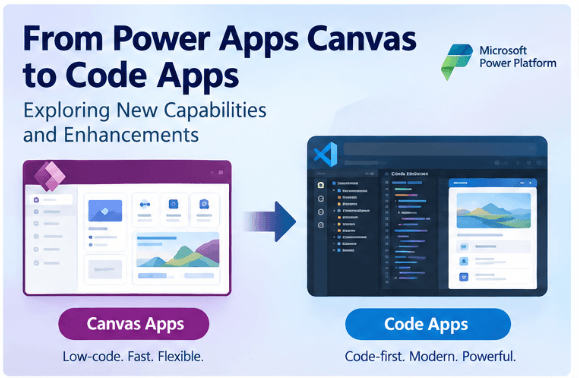
This is where Power Apps Code Apps bring an interesting new dimension to the Power Platform.
Code Apps enable developers to build applications using familiar web development technologies while still taking advantage of the Power Platform ecosystem. Rather than replacing Canvas Apps, Code Apps expand the choices available to developers and organizations.
From Low-Code to Pro-Code
Canvas Apps follow a low-code development approach. Developers can design screens visually, use Power Fx for business logic, connect to multiple data sources, and rapidly deliver applications.
This approach works particularly well for business applications such as:
-
Sales and order processing
-
Warehouse and inventory management
-
Employee requests
-
Approvals
-
Field service
-
Inspection and data collection applications
However, some applications require more sophisticated capabilities, such as highly customized user interfaces, complex client-side logic, advanced animations, reusable web components, or integration with existing JavaScript and TypeScript libraries.
Traditionally, such requirements would often lead organizations toward conventional web development.
Code Apps help bridge this gap.
Developers can use modern web technologies and development tools while bringing the application into the Power Platform ecosystem.
What Are Power Apps Code Apps?
Power Apps Code Apps provide a code-first approach to building web applications.
Instead of designing the application primarily through Power Apps Studio, developers can work in familiar development environments such as Visual Studio Code and use technologies such as JavaScript, TypeScript, React, and Vue.
This provides developers with greater control over:
-
User interface
-
Application architecture
-
Client-side logic
-
Reusable components
-
Source code
-
Development workflow
-
Testing
-
Version control
At the same time, Code Apps can integrate with Power Platform capabilities such as Dataverse, connectors, authentication, and other platform services.
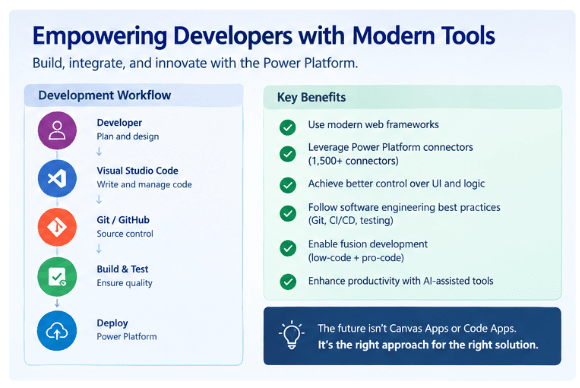
This combination is particularly interesting for organizations that already have significant investments in Power Platform but also have professional development teams.
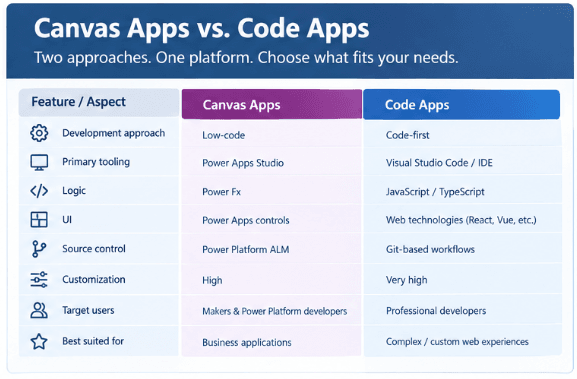
Canvas Apps vs. Code Apps
| Area | Canvas Apps | Code Apps |
|---|---|---|
| Development | Low code | Code-first |
| Primary tooling | Power Apps Studio | Developer IDE |
| Logic | Power Fx | JavaScript / TypeScript |
| UI | Power Apps controls | Web technologies |
| Source control | Power Platform ALM | Git-based workflows |
| Customization | High | Very high |
| Target users | Makers & Power Platform developers | Professional developers |
| Best suited for | Business applications | Complex/custom web experiences |
The important point is that Code Apps are not intended to make Canvas Apps obsolete.
Instead, developers now have more choices.
The Power of a Hybrid Approach
One of the most exciting possibilities is combining low-code and pro-code development.
Consider an enterprise application where:
-
Canvas Apps are used for simple internal processes.
-
Code Apps provide a highly customized user experience.
-
Dataverse stores business data.
-
Power Automate manages workflows.
-
Power BI provides analytics.
-
Copilot Studio provides conversational experiences.
-
Azure supports advanced integrations where required.
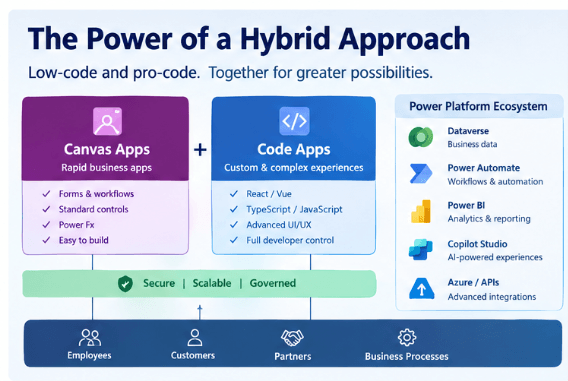
This creates a broader application architecture rather than forcing every requirement into a single technology.
For example, a warehouse solution could use a Code App for a highly customized warehouse interface while using Dataverse for data, Power Automate for notifications and workflows, and Power BI for operational reporting.
The result is a Power Platform + Pro-Code architecture.
Benefits for Professional Developers
Code Apps can be particularly valuable for developers who already work with modern software development practices.
Developers can potentially use:
-
Visual Studio Code
-
Git and GitHub
-
React
-
Vue
-
TypeScript
-
npm
-
APIs
-
Automated testing
-
CI/CD pipelines
This allows Power Platform development to align more closely with established software engineering practices.
It also supports the concept of fusion development, where Power Platform developers and professional developers collaborate rather than working in separate technology ecosystems.
A Power Platform developer may focus on Dataverse, Power Automate, and business processes, while a professional developer focuses on advanced application experiences and custom code.
Code Apps and AI-Assisted Development
The evolution of Code Apps is also happening alongside rapid advances in AI-assisted development.
Tools such as GitHub Copilot and other AI coding assistants can help developers generate code, create components, troubleshoot issues, refactor implementations, and accelerate repetitive development tasks.
This changes the role of the developer.
Instead of spending most of the time writing repetitive code, developers can increasingly focus on:
-
Application architecture
-
Business requirements
-
Security
-
Integration
-
Performance
-
Testing
-
Governance
-
Code quality
AI therefore becomes an accelerator rather than a replacement for development expertise.
The combination of Code Apps + AI-assisted development + Power Platform services could significantly improve developer productivity.
When Should You Choose Canvas Apps?
-
Canvas Apps remain an excellent choice when:
-
Rapid application development is required.
-
The application is primarily business-process driven.
-
Standard Power Apps controls meet the UI requirements.
-
Power Platform integration is central to the solution.
-
Low-code development is preferred.
-
The application does not require extensive custom frontend development.
For many internal business applications, Canvas Apps will continue to provide the fastest path from requirement to working solution.
When Should You Consider Code Apps?
Code Apps become more attractive when the application requires:
-
Highly customized UI/UX
-
Advanced frontend interactions
-
Complex client-side logic
-
React, Vue, or TypeScript
-
Existing web development libraries
-
Strong Git-based development practices
-
Greater control over application architecture
-
Professional software engineering and testing practices
In these scenarios, forcing everything into a traditional Canvas App may not always be the most efficient approach.
The Future: Low-Code + Pro-Code
The evolution of Power Apps demonstrates that the future is not necessarily about choosing low-code OR pro-code.
It is increasingly about using low-code AND pro-code where appropriate.
A modern development team may use:
Canvas Apps for rapid business applications
Code Apps for highly customized experiences
Dataverse for enterprise business data
Power Automate for process automation
Power BI for analytics
Copilot Studio for AI-powered interactions
Azure / APIs for advanced integrations
This provides organizations with flexibility while allowing different development teams to work within a common ecosystem.
Conclusion
The transition from Canvas Apps to Code Apps represents an important evolution of the Power Platform.
Canvas Apps continue to provide an excellent low-code approach for rapidly building business applications. Code Apps, meanwhile, open the door to modern web development practices and greater flexibility for professional developers.
The real value is not choosing one over the other.
The real value is understanding which approach is appropriate for each business requirement.
As Power Platform continues to evolve, developers who understand both low-code and pro-code development will be better positioned to build scalable, maintainable, and user-friendly enterprise solutions.
The future of Power Platform is therefore not simply Canvas Apps or Code Apps.
It is the ability to bring low-code, pro-code, automation, data, and AI together to solve business problems effectively.